Check in on playtime
Set a device facing the play area and glance at live view from the next room. Use Talk to let the kids know lunch is ready. A quick check-in alongside adult supervision.
 zurcit.Sign in ↗
Turn your device into a security camera.
Turn the device you have into a camera where you need one. Check on playtime, watch the side gate, or keep an eye on your room while traveling. Watch live, save the moment, and speak through your camera.
Coming to the App Store. Currently in private testing.
Your view. Your choice.
Face the entrance. Arm it before you step out. Review the moment from another device.
Everyday ways to use Zurcit
A device, a charger, and a clear view. Make a camera for the everyday places that matter to you.
Set a device facing the play area and glance at live view from the next room. Use Talk to let the kids know lunch is ready. A quick check-in alongside adult supervision.
Aim at a side gate, patio, or backyard entrance to watch for people coming into view. Keep the device indoors facing out through a clear window. Check for reflections, and test the view in daylight and after dark.
Point a camera toward your entryway or porch. When it spots a person, review the saved photo and clip. Open live view to check what is happening, or speak through the camera’s speaker.
Use your current phone or a spare device to face the room’s entrance. Arm it before stepping out, with an optional alarm and exit countdown. Check person alerts from another signed-in device.
Give a spare device a view of the garage entrance or workshop. See when someone appears, review the moment later, and keep that camera alongside your other views in the video wall.
Watch a home office or storage-room entrance while you are elsewhere. See person alerts in your shared Events screen, check the live view, and play a chime or speak through the selected camera.
From your device to a room camera
Open Zurcit on the device you want to use, sign in, and add it as a camera. Give it a name like “Living room,” “Office,” or “Travel camera.”
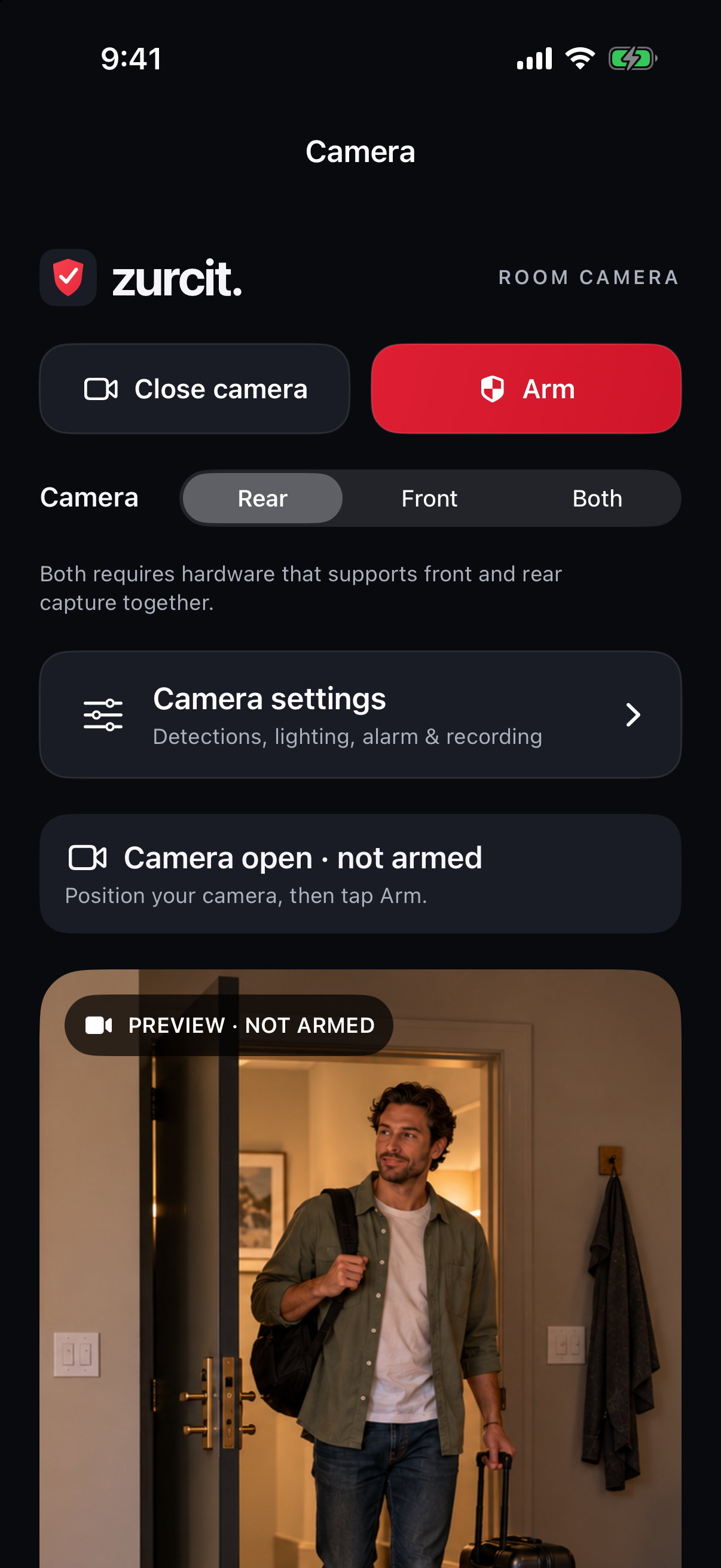
Tap Open camera to position it, then Arm to watch for people. The screen tells you when it is watching. Turn on the optional alarm for a 30-second exit countdown, and use Dim to lower the screen brightness.
Open the video wall on your other signed-in device. Your shared Events screen brings together alerts from every camera, with photos, clips, and email alerts. Select a camera to talk or play a sound.
What Zurcit does
Turn your iPhone or iPad into a camera, then watch and respond from another device. Free includes live video and on-camera motion detection. Paid plans add saved moments, alerts, and remote responses, together in one account.
Bring your cameras together in a live wall. Open a view, zoom in, and look around.
Pick the detections that matter for each camera.
One Events screen brings together photos and short clips from all your cameras.
Choose the alerts you want, camera by camera.
Select a camera and use its controls without leaving live view.
Invite a friend or relative to keep an eye on selected cameras with you.
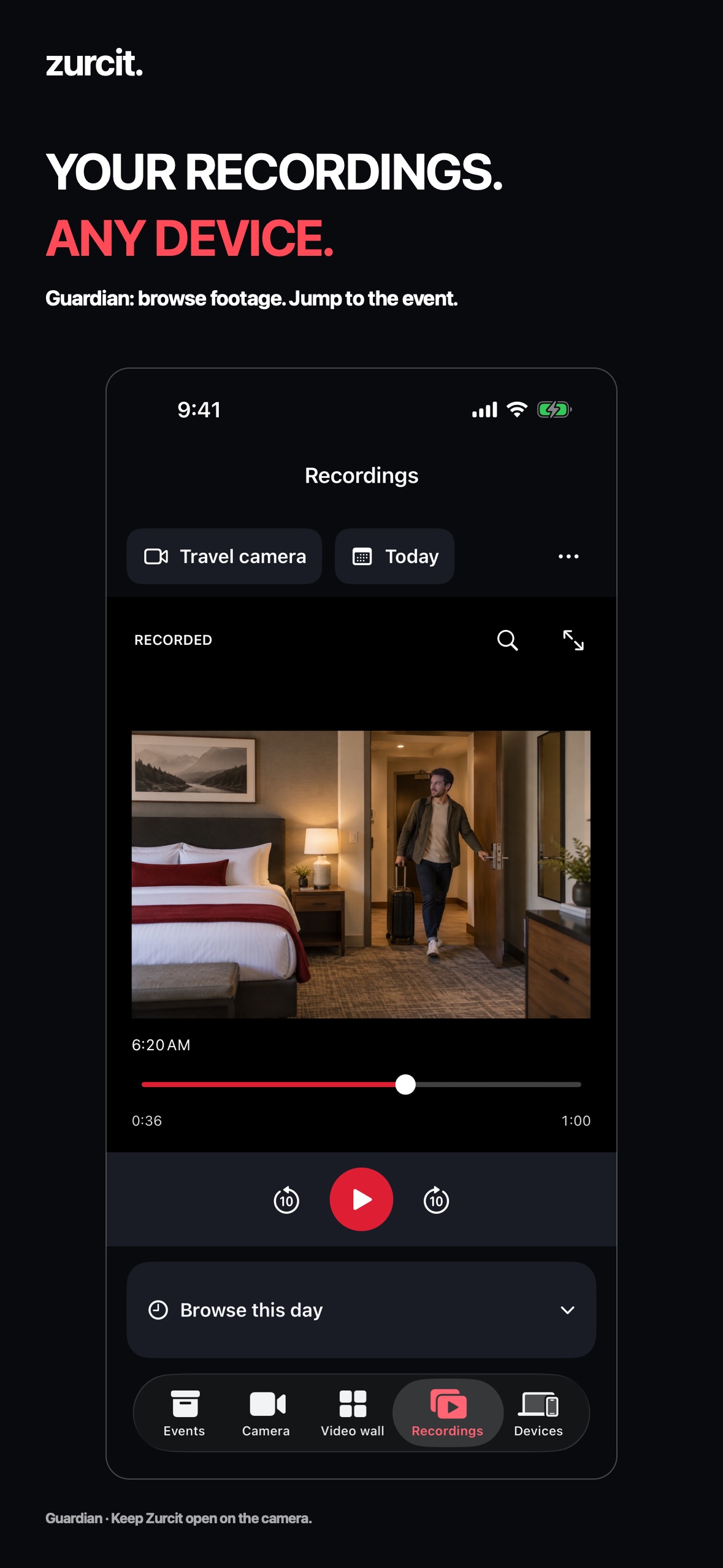
Optional silent continuous video uses an eight-hour loop with Scout, or your selected storage limit with Guardian. Scout playback is on the recording camera. Guardian lets you browse this footage from any account device in the Recordings tab. Choose a camera and day, then use the video timeline to review the moment. From an event, choose View longer recording to jump to the moment. Guardian backs up completed footage privately, so uploaded recordings play even while the camera is offline. Leave Zurcit open until its backup finishes. Your selected recording storage and loop limits also apply to backups.
Add two cameras free, seven with Scout, or unlimited with Guardian. Sort cameras or touch and hold to arrange them. Rename, edit location, or remove any owned camera, including offline cameras, with clear controls and a deletion summary. Reconnect a lost source connection to its original entry. Check battery and connection status and request updates from an online camera.
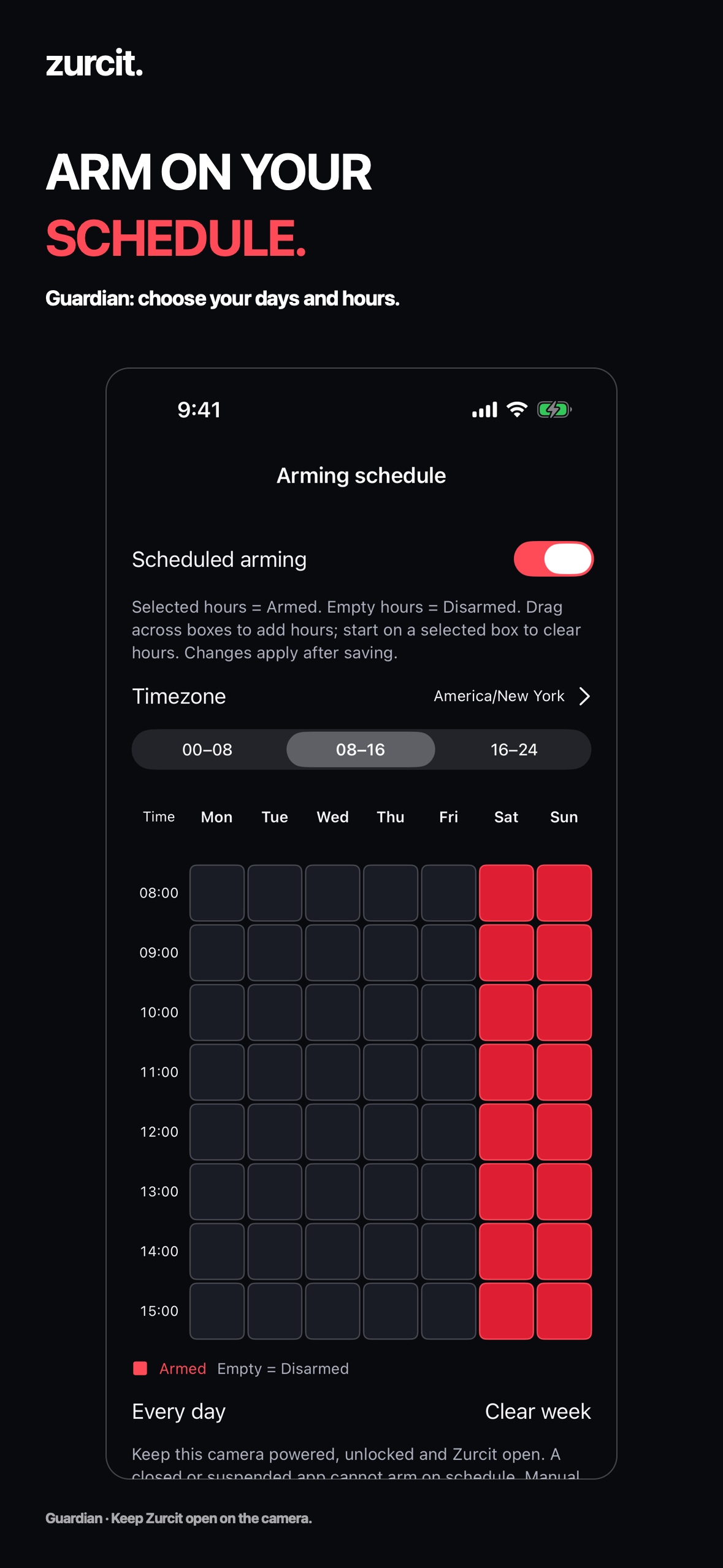
In Devices, drag across days and hours to choose when each camera is armed. Pick its time zone and save. Clear hours disarm it; manual changes last until the next scheduled hour. Keep Zurcit open, the camera unlocked, and remote controls enabled.
Room readiness checks your camera view and this device’s actual depth and flashlight capabilities. Compatible rear LiDAR can assist with movement; optional rear lighting illuminates detected movement for 20 seconds. Ordinary cameras need some visible light. Depth does not identify people or provide night vision. Test your doorway in its actual lighting.
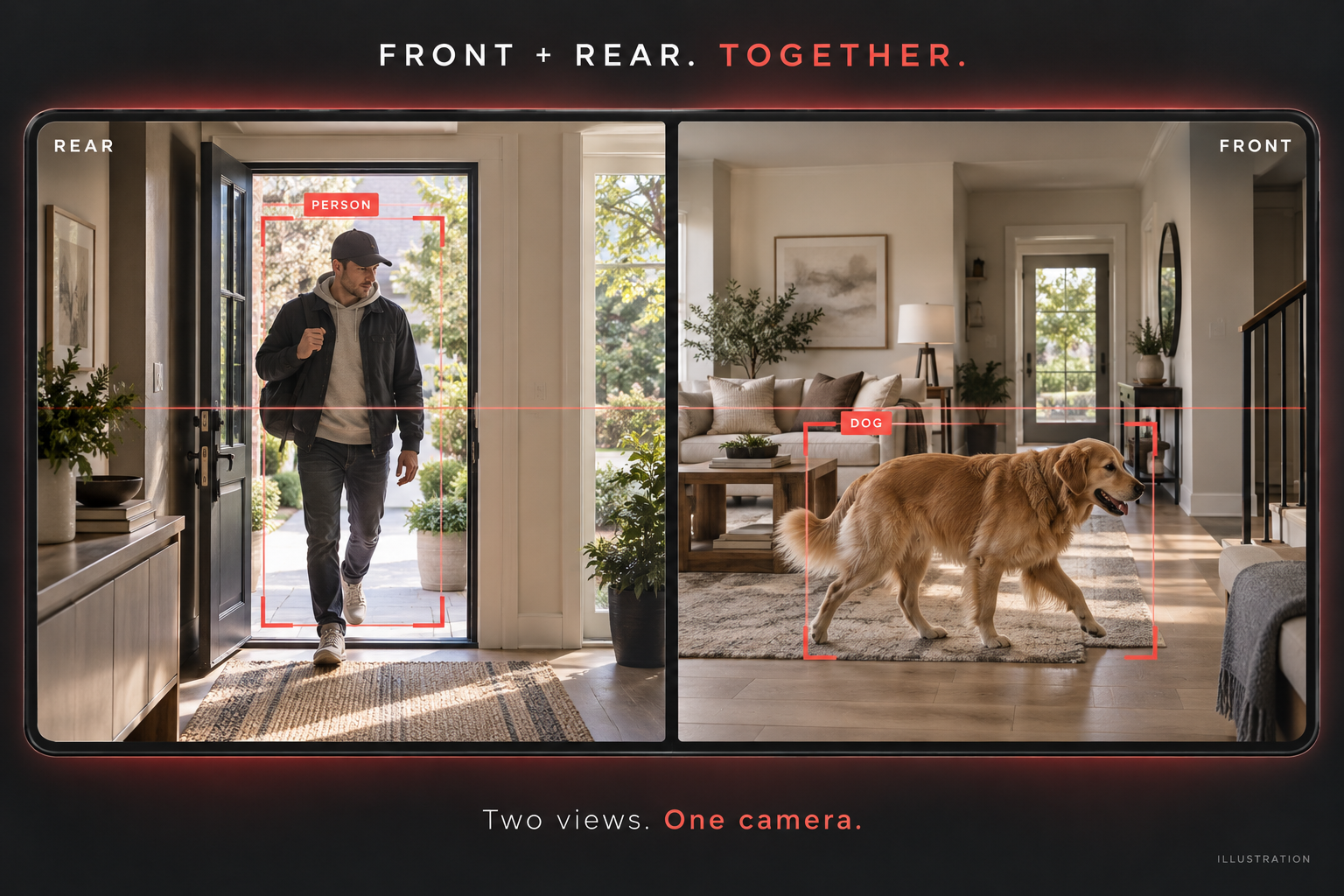
Choose Front, Rear, or Both on a compatible iPhone or iPad. Both detects activity in each view and combines them side by side in Video wall and recordings, with recording and detections according to your plan. One device counts as one camera. Availability and quality depend on the hardware. Dim its screen while monitoring, and use an Arm/Disarm Home Screen widget to open the app and send a command.
Scout and Guardian send “URGENT: Battery low” emails at 15% or less, then a critical warning at 5% or less, when this camera’s email alerts are enabled. Keep Zurcit open on the camera so it can report its battery. Warnings pause while charging and restart after charging above 20%.
Use Apple Screen Mirroring for the whole wall or AirPlay for one video feed on a compatible TV or receiver.
Keep your camera ready. Remote viewing and controls need the camera powered, unlocked, and Zurcit open. Internet is needed for account access and cloud alerts. Direct Wi-Fi viewing requires compatible native devices and Local Network permission. Browser and TV feeds remain silent; event clips and continuous recordings are silent.
Detection and video depend on device performance, lighting, temperature, and network quality. Interrupted clips may be shorter. Try your chosen view before relying on it. Family check-ins supplement adult supervision. Compare what is included in Free, Scout, and Guardian ↓.
Made for the devices you already have
We’re testing Zurcit on iPhone X and newer iPhones, plus iPads running iOS 16 or later. A Mac version is also in development. We’ll confirm supported devices before launch.
Start free. Grow your view.
Try live viewing and motion detection free. Choose Scout for people alerts, or Guardian for every available detection and longer event history. Scout includes seven cameras; Guardian includes unlimited registered cameras.
Free
$0 / month
Scout
$3.99 / month
Guardian · Most complete
$11.99 / month
Saved detection photos and clips · Listen and Talk · remote Arm/Disarm · email and push event alerts · urgent battery warning emails · timed sharing with a trusted helper.
Video adapts down when your connection or device needs it. Maximum resolution depends on the plan and supported camera. Remote controls and footage that has not backed up need the source camera powered, unlocked, and Zurcit open. Guardian’s backed-up recordings remain playable while it is offline. Helpers do not need a paid plan.
| What you get | Free | Scout | Guardian |
|---|---|---|---|
| Monthly price · USD | $0 | $3.99 | $11.99 |
| Cameras | 2 | 7 | Unlimited |
| Maximum live video | Low resolution · 360p | Full HD · 1080p | Full HD · 1080p |
| Motion detection | On-camera indication | Saved events & alerts | Saved events & alerts |
| People detection | — | Included | Included |
| Pets & vehicles | — | — | Included |
| Cloud event history | None | 30-day event history | 6-month event history |
| Continuous video on the camera | — | Eight-hour loop | Selected storage limit |
| View stored recordings | — | On the recording camera | Any device on your account |
| Weekly arming schedules | — | — | Included |
| Low battery email warnings | — | 15% and 5% | 15% and 5% |
| Email, push, Talk & helper sharing | — | Included | Included |
Eligible new subscribers can try their selected paid plan free for one week through Apple. After the trial, it renews at $3.99/month for Scout or $11.99/month for Guardian unless cancelled at least 24 hours before the trial ends. Apple confirms eligibility and your local price before you subscribe.
Free does not require a subscription. Manage, cancel, or restore paid subscriptions in the app and Apple subscription settings. Deleting your Zurcit account does not cancel an Apple subscription. Manage with Apple ↗ · Terms of Use ↗
Cloud events and continuous recording are different. Cloud history stores detection photos and short clips, not all-day video. Continuous footage is saved on the camera and overwrites its oldest recordings at the chosen limit. With Guardian, reviewing it from another signed-in device temporarily transfers only the section you request. New cloud events receive the history period active when they are captured; changing plans does not extend older events.
Coming to the App Store. These are the launch plans; purchase and restore validation is still in progress. Existing private-test events keep their original seven-day history. No purchase is required to create a test account.
Scout is $3.99/month for people detection and 30 days of cloud event history. Free includes low-resolution live video and motion detection for two cameras, without recording or cloud alerts. Guardian is $11.99/month for all available detections and six calendar months. All prices are USD; Apple shows the local price before purchase. Scout covers seven cameras; Guardian covers unlimited registered cameras. An eligible one-week Apple trial renews into your selected plan unless cancelled. See the full comparison and trial terms above.
Yes. Sign in or create an account on the welcome screen. Your shared Events screen opens after sign-in. Video wall and Devices keep viewing and device management a tap away.
Zurcit can save optional continuous video saved on the camera while armed. Choose an eight-hour rolling history or, where available, retention until the chosen storage limit. Oldest footage is overwritten; interruptions leave gaps. Continuous video is silent and saved locally. Open the Recordings tab to watch saved video and move through its timeline. Scout playback is on the recording camera; Guardian lets you review footage from any device on your account. Remote playback prepares a temporary private download; keep Zurcit open on the source camera. Selected detections separately save a photo and a 10-second clip to your account. Your camera needs the internet for cloud events, email alerts, remote viewing and Talk.
Yes. The camera and viewer can use different Wi-Fi networks or cellular data. Both need an internet connection for account access, email, remote controls, and Talk. On the same Wi-Fi, updated apps can use a direct connection for video when Local Network permission is allowed. Internet video and voice can have several seconds of delay.
No. On iPhone and iPad, keep Zurcit open, the camera device unlocked, and remote access enabled. You can then arm or disarm it from another signed-in device. Remote Arm cannot launch a locked or suspended app.
Open Events → bell, or Account → Event sounds on this device. Turn on event chimes, choose a sound, and set its level and your device volume. Test it. New events from any camera sound on every screen while Zurcit is open. Enable push notifications in Account → Event alerts to receive camera alerts when the iPhone or iPad app is closed. Choose Email alerts and Push alerts separately for each camera in Devices. Push sounds follow your device’s notification settings.
Yes, in the updated native app. In Devices on the camera, enable Allow live room audio and grant microphone access. On the video wall, select that camera and tap Listen. Views start muted; switching cameras, leaving the wall, or tapping Mute stops listening. Talk sends your voice the other way. Event clips stay silent. Browser and TV video remain silent for now.
Zurcit is still being tested. It can miss someone in dim light or if they move quickly, and it cannot watch while the camera is paused. Try it in your room before relying on it. It does not call emergency services.
Yes. Delete individual recordings, remove a camera, or delete your account from the app’s account menu or web dashboard. Photos already sent to your email and recordings saved on an offline device must be deleted there too.